Hold callers in a queue and ring your agents until the next available one answers.
¶ How a queue handles calls
The queue rings your assigned agents — all at once or in an order you choose, set by the ring strategy.
| Outcome | What happens |
|---|---|
| Call answered | The other agents' phones show Answered Elsewhere. |
| Call not answered | The call is logged as a missed call. |
A single unanswered queue call can show as several missed-call alerts on an agent's phone — often 2 to 6 — because the queue retries the ring cycle, and each retry can log another alert. How many depends on the queue's timeout.
While waiting, callers hear your hold music or message.
¶ Create or edit a queue
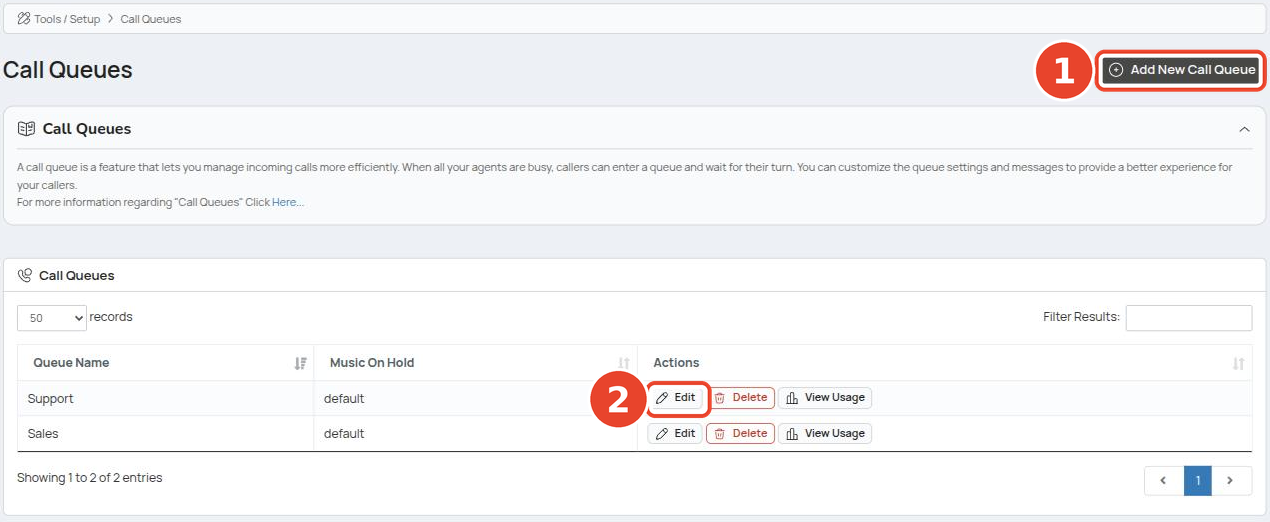
Go to Tools / Setup → Call Queues.
- Click Add New Call Queue to create one.
- Click Edit on a queue to change it.
¶ Queue settings
On the edit screen, set how the queue behaves.

| # | Setting | What it does |
|---|---|---|
| 1 | Enable Announce Hold Time | Tells waiting callers their position in the queue. |
| Announcement Frequency | How often (in seconds) that position is announced. | |
| 2 | Strategy | How incoming calls are shared across agents. See Ring strategies. |
| 3 | Dial Busy Agents? | Also ring agents who are already on a call. |
| Music On Hold | What callers hear while waiting. Upload your own with +Add New. | |
| Ringtone | The ringtone agents hear for queue calls. |
Click Save Changes when you're done.
¶ Ring strategies
| Strategy | Behaviour |
|---|---|
| Ring All | Ring all available agents until one answers. |
| Least Recent | Ring the agent who least recently finished a call from this queue. |
| Fewest Calls | Ring the agent with the fewest completed calls from this queue. |
| Random | Ring agents in random order. |
| Round Robin with Memory | Continue from where the last cycle stopped and ring the next agent. |
| Round Robin with Memory (Ordered) | Same, but follow the queue order. |
¶ Add or remove agents
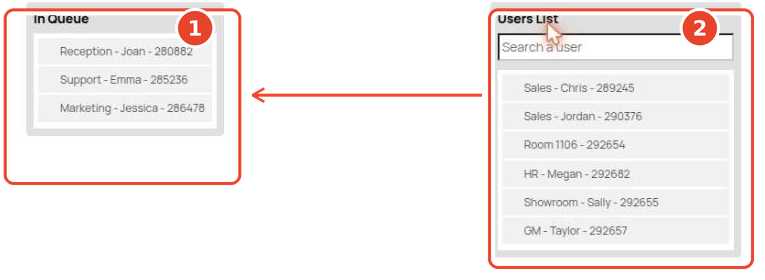
Agents in In Queue receive the queue's calls. On the edit screen, scroll to the two lists at the bottom.
- In Queue — agents currently taking calls.
- Users List — everyone else. Search here to find someone.
Drag an agent from Users List into In Queue to add them; drag them back out to remove them. Then click Save Changes.
¶ Log in, out, and pause from your phone
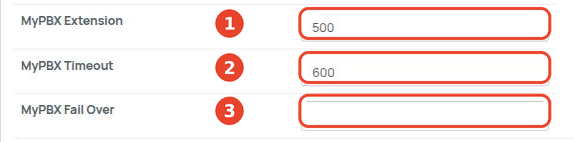
Set the queue's MyPBX fields at the bottom of the edit screen. These give the queue a short code agents can dial from any handset.
| # | Field | What it does |
|---|---|---|
| 1 | MyPBX Extension | The queue's short code (e.g. 500). Dial it to reach or transfer a call into the queue, or use it with the prefixes below to log in/out and pause. |
| 2 | MyPBX Timeout | How long (in seconds) a call waits in the queue before it's treated as missed. |
| 3 | MyPBX Fail Over | Where to send the call if the queue times out. Optional. |
Once the MyPBX Extension is set, agents dial these codes. The examples assume a short code of 500.
| Action | Dial | You'll hear |
|---|---|---|
| Log in | *500 |
A prompt confirming you're logged in. |
| Log out | **500 |
A prompt confirming you're logged out. |
| Pause / unpause | ***500 |
"activated" when you pause, "deactivated" when you return. |
Pausing keeps you in the queue but stops calls reaching you — handy for a short break. Dial ***500 again to come back.
Swap 500 for your own queue's MyPBX Extension.