¶ Overview
Yealink cordless handsets come in a base station and handset configuration, so you can several handsets connected to the same base station for flexibility
¶ Specific Devices
¶ To Setup Yealink W70B or W60B
Connect the base station to your router and power supply, then register your handsets following the on-screen instructions.
1. Unbox the Equipment: Ensure you have the following items: Yealink W70B base station, power adapter, Ethernet cable, and the handsets (e.g., W56H) you wish to register.
2. Connect the Base Station:
Power Connection: Connect the power adapter to the base station and plug it into a power outlet.
Network Connection: Use the Ethernet cable to connect the base station's Internet port to a free port on your router or network switch. This connection is essential for VoIP functionality.
3. Power On the Base Station:
Once connected, the base station will power on. Wait for it to initialize; the LEDs should indicate a successful startup (usually glowing green).
4. Prepare the Handsets:
Insert the rechargeable batteries into each handset and close the battery cover. Place the handsets in their charging cradles and allow them to charge for at least 6 hours before first use for optimal battery performance.
5. Connecting a Handset to a Base Station
Ensure the handset is charged and the base is connected to your network (e.g., using an Ethernet cable).
- On the base station, press and hold the Wi-Fi button (or a similar button) until the light starts flashing.
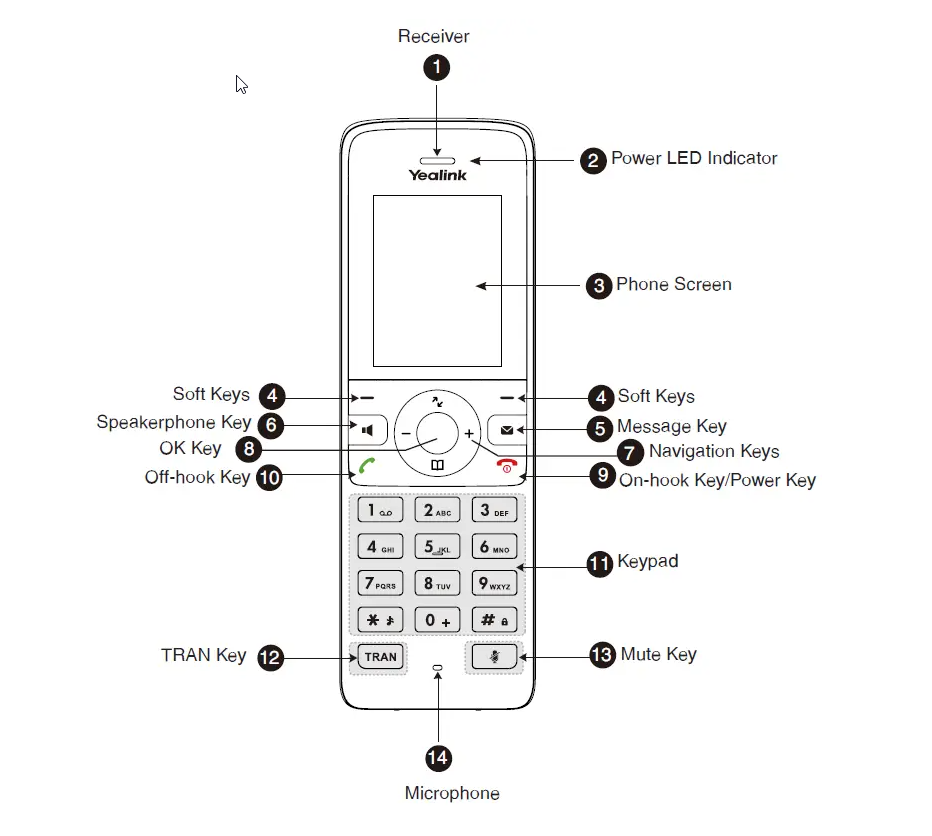
- On the handset, press the "Menu" button (or similar) to access the settings.
- Navigate to "Registration" and select "Register Handset".
- Select the base station from the list and press "OK".
- Enter the base station PIN (default: 0000) and press "Done".
If you have multiple handsets, you can repeat these steps for each handset.
¶ Factory Reset
¶ Factory Reset Via Physical Button
-
Unplug the power supply: Disconnect the power cord from the W70B base station.
-
Press and hold the paging button: Locate the paging button (usually a Wi-Fi symbol) and hold it down.
-
Plug in the power supply: While still holding the paging button, plug the power cord back into the base station.
-
Release the button: Release the paging button when you see all three LED indicators (power, network, and registration) light up solid green.
-
Restart the base station: Unplug and plug the power supply back in to restart the W70B.
Option 2 - Reset Base via Settings menu on any handset.
-
Press OK Key
-
Go to Settings
-
Select 8. System Settings
-
Select Base Reset and Enter in password “0000”
-
Press Yes to reset base and wait for base station to reconfigure and reboot itself.
IF handset is already registered, the base will automatically re-register the handset once it has completed its update.
¶ Factory Reset via Web Interface
- Access the web interface: Connect your computer to the same network as the W70B and open a web browser.
- Log in: Enter the IP address of the W70B in the address bar and log in using the default username ("admin") and password ("admin").
- Navigate to the Upgrade tab: Locate the Upgrade tab in the web interface.
- Click the Reset button: Click the Reset button to initiate the factory reset process.
- Wait for the reboot: The base station will reboot to the factory default settings.
¶ Manual configuration
- Press OK Key
- Go to “Status”
- Select “Base”
- Note down IPV4 example: 192.168.X.X
- Open Browser type IPV4 Address in the URL Address bar
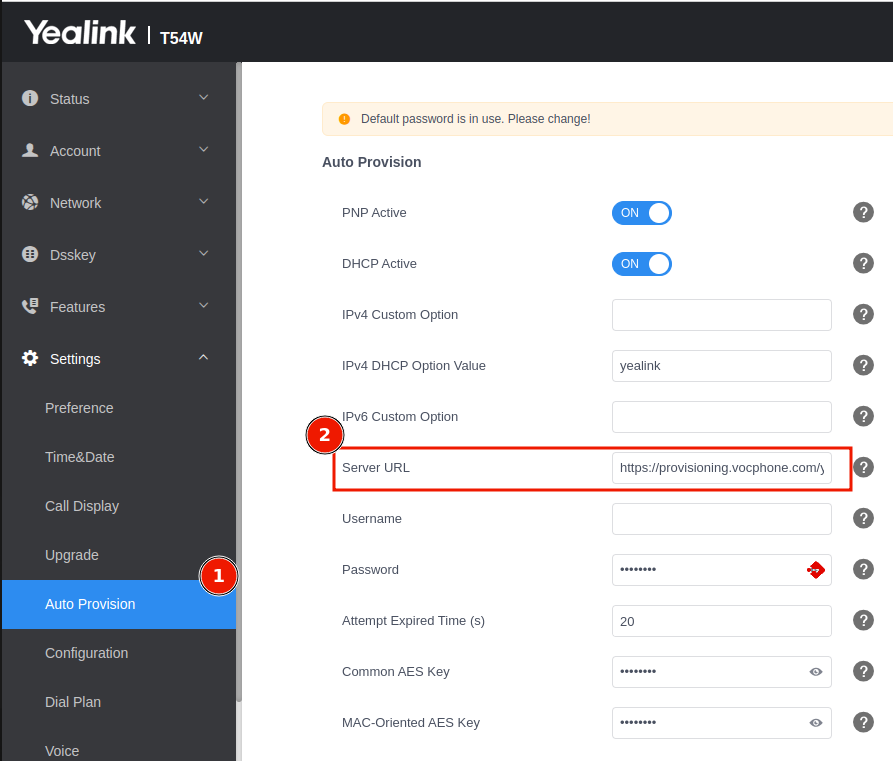
Log into yealink phone via browser
Obtain IP address from menu.
- Menu > Status > IPV4
- Enter IP Address within browswer URL
- Settings > Auto Provsion
- Servier URL Set the Auto Provision > Server URL: http://provisioning.vocphone.com/yealink
- Press AUTO Provision