¶ TP Link HX510
A common router often provided directly from Building Managers and/or agreements with Supa Networks
¶ User Guide
You can download directly from the tp link website
USER GUIDE
TP Link Downloads
¶ Wifi
These routers have a shared wifi setup which has been known to cause some issues for users, to combat this we recommend that you setup a multi-ssid network
HX510 Wifi Specifications are Dual-Band Wi-Fi 6: Speeds up to 3000 Mbps—2402 Mbps on 5 GHz and 574 Mbps on 2.4 GHz.*
If you found that your connection is below 500mbs, your connection may be stuck on the 2.4ghz WIFI Connection
¶ Multi SSID Network
the shared / single SSID generally has a degradation on the performance as the router "decides" which is not always the right decision we only need 1 ssid per band. Below are the instructions directly from the TP-Link User Guide
The mesh device supports additional up to three multi-SSID wireless networks for
client access in each wireless band. You can specify the access and security settings
to ensure network security and privacy according to your situation.
- Visit http://tplinkwifi.net or http://192.168.88.1, and log in with the password you set for your mesh device.
- Go to Advanced > Wireless > Multi-SSID.
1 ) Locate the Multi-SSID section, and click 2.4GHz to open the
corresponding setup page.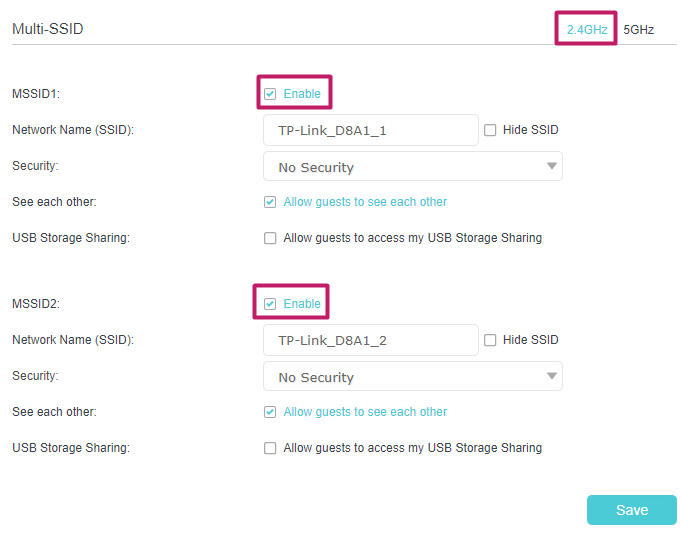
2 ) Ensure MSSID1 and MSSID2 are both disabled
3 ) Click 5Ghz
2 ) Select the Enable MSSID 1
3 ) Enter a new Network Name (SSID) or use the default name, this field is case
sensitive. Don‘t select Hide SSID unless you want your guests to manually input
the SSID for Wi-Fi access.
4 ) Select the Security option for the multi-SSID network, WPA/WPA2 Personal is
recommended, and you can set a password for the network.
If you want to allow the clients in your Multi-SSID network to communicate with
each other via methods such as Network Neighborhood and Ping, select the
Allow Guests to See Each Other check box.
If you want to allow the clients in your Multi-SSID network to access your mesh
device’s USB storage sharing via methods such as Network Neighborhood and
FTP, select the Allow Guests to Access My USB Storage Sharing check box.
5 ) click Save to make the settings effective.