Another great feature with Voice Over Cloud is SMS.
Here you can send SMS messages to your customers and group the conversation as you would with your mobile device but this can be viewed across multiple devices.
There are 2 ways to SMS with us.
Note: All outbound SMS is charged at 0.10c per SMS; there is no inbound rate on SMS.
They can use 170 characters, including spaces. (alpha-numeric)
IF THEY USE SPECIAL CHARACTERS, the limit from 170 will go down to 70 (including spaces)
¶ Send one way SMS
Send only is available for everyone even if you do not have a mobile number you can still send a no-reply SMS to your customers displaying any custom display name. (your business name)
¶ One Way SMS - Send only
You will need to request for a SENDER ID in order for you to be able to send out an SMS. Example would be your business name. This will allow you to send out notifications to customers but will not give them the option to respond back.
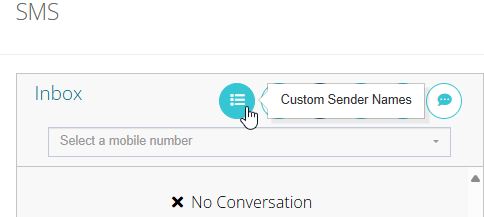
Click on Customer Sender Names
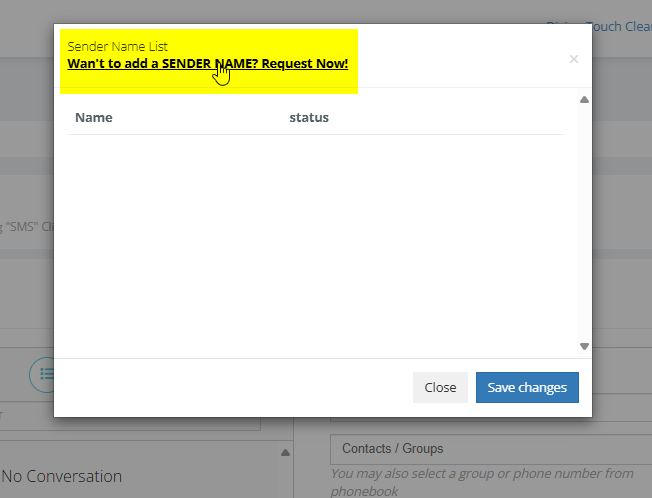
Click on "want to add a SENDER NAME? Request now!"
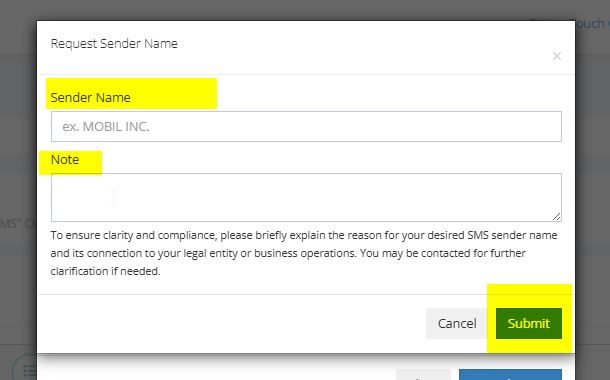
Enter your Send ID and once it has been approved by our team you will then be able to send out SMSs from you ID
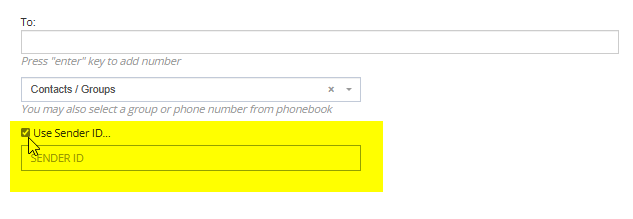
Simple start a new SMS and select sender ID and select from the dropdown list.
¶ 2 Way SMS (Send and receive)
This requires you to have a mobile number applied to your account, mobile numbers can be added for a charge of $10.00 per month per number, you can also use this mobile to number make and receive calls.
¶ Two Way SMS - Send and receive
This requires you to have a mobile number applied to your account, mobile numbers can be added for a charge of $10.00 per month per number, you can also use this mobile to number make and receive calls.
Once you have applied a mobile number to your phone account, The mobile number will appear in the drop down menu for you to choose.
If you have Multiple numbers this will also appear here.

¶ Giving Access to SMS for your User/Extension to SMS App
Our key feature of the SMS system is that it can also be sent and received through our mobile app (only if you have a mobile number on your account).
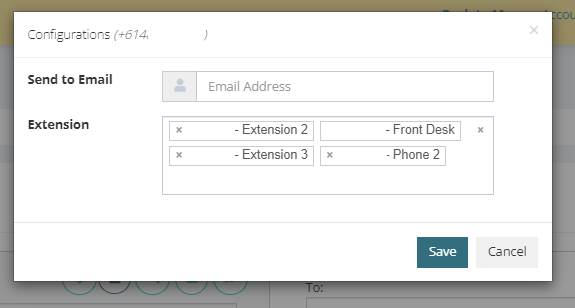
Benefits of this feature is that you can add a number of extensions/users to the one mobile number and this will then allow you to view the SMS Conversations on each of those devices.
You can also setup email notifications on this page, this will send a snippet of the SMS conversation to your email.
To set this up, Simply click on the sprocket and add the extension/user you wish to allocate the number to
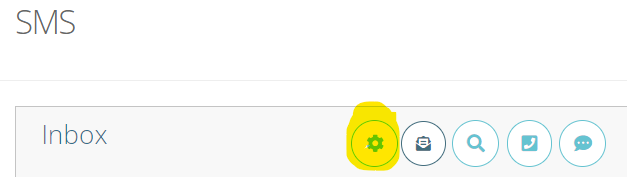
Here you will also be able to enter in an email address to receive SMS notifications.
¶ Custom Sender ID Name
¶ What is a Sender ID Name?
A Sender ID Name is a feature used by customers who need to send SMS messages without displaying a mobile number as the sender. Instead, the name of the sender—often a company name or brand—appears on the recipient's device.
¶ Key Use Cases for Sender ID Names:
No Mobile Number on the Account:
- For customers who do not have an associated mobile number but still need to send SMS messages, a Sender ID Name provides a professional and recognizable identity for the sender.
Company/Brand Representation:
- Businesses often use this feature to ensure their company name is visible as the sender, building trust and ensuring recipients can easily identify the message's origin.
This feature is particularly useful for marketing, notifications, and transactional messages where brand recognition is essential.
¶ How to Use the Sender ID Name in Portal Go SMS
¶ Log in to the Portal Go SMS platform.

- Click on the Message icon.
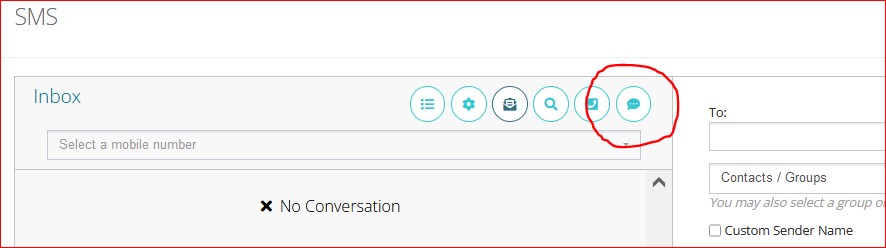
- Tick the checkbox to select your Sender ID Name from the list.
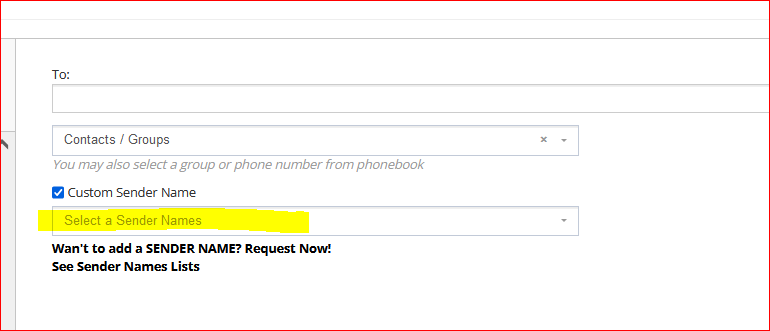
- Once the Sender ID Name is selected, type your message in the message box.
- After composing your message, click Send to deliver it.
How to Apply for a Sender ID Name in Portal Go SMS
¶ If you do not already have a Sender ID Name:
- On the page, click "Want to add a SENDER NAME? Request Now!" to apply for one.
- Submit your request for approval.
- Once your Sender ID Name is approved, you can use it for your SMS transactions.
Important Notes:
We do not allow the following as Sender ID Names:
- Phone or mobile numbers.
- The name of a person who is not associated with the account.
- The name of a company that is not related to the account.