An IVR is a press-1-press-2 phone menu: callers hear an announcement and press a key on their phone to be routed to the right destination.
IVRs are managed at Tools / Setup → Interactive Voice Response. To change what callers reach when they press a key — for example, send every option to your mobile — edit the IVR here, not the number's route. An IVR is the last step of a number's call route; everything after it is set on the IVR's keypad routes.
IVRs are often combined with time conditions so the menu only plays during business hours.
An IVR needs an audio playback — a WAV file or text-to-speech announcement. Create one first, or add one while creating the IVR.
¶ Send every menu option to your mobile
The menu plays, and whichever key the caller presses rings your mobile.
- On Numbers, check Routing To to see which IVR the number uses.
- Go to Tools / Setup → Interactive Voice Response and click Edit on that IVR.
- Open Route Configuration and click key 1.
- Choose Basic Route — Stand alone destination → Divert, enter the mobile number, click Accept Route.
- Repeat for every key the announcement mentions (2, 3, …).
- Set Keypad Selection Timeout, Invalid Keypad Selection and Error Occurrence the same way (or to { Repeat Current IVR }), so nobody is cut off.
- Click Update IVR, then call the number to test.
No menu wanted? Set the number's call route to a single Divert step → your mobile, or use the Immediate diversion under Manage Number → Diversions — see Call Diversions.
If the person has the VocPhone mobile app, a User destination rings the user's devices, including the app.
¶ Create an IVR
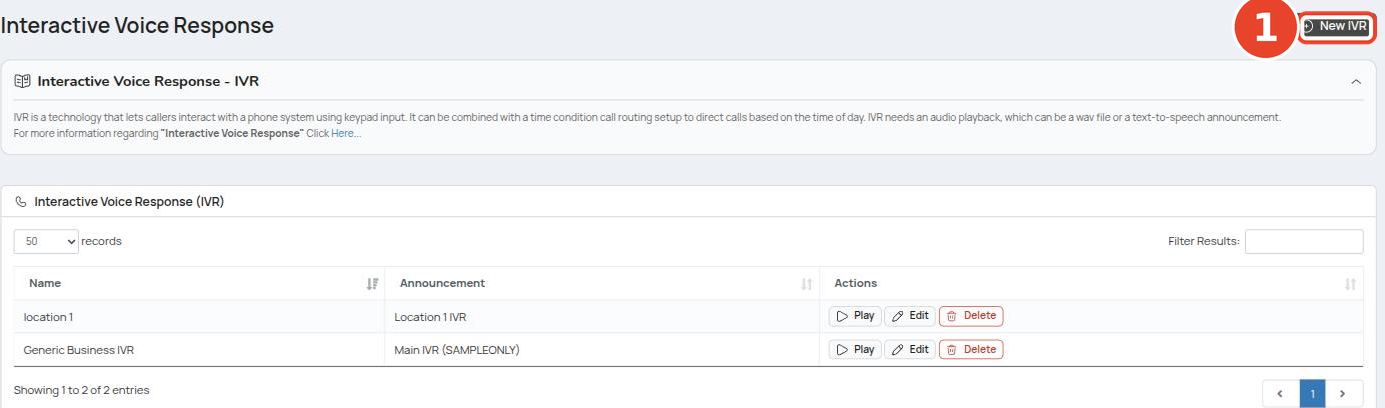
- Go to Tools / Setup → Interactive Voice Response.
- Click New IVR (①).
¶ IVR settings
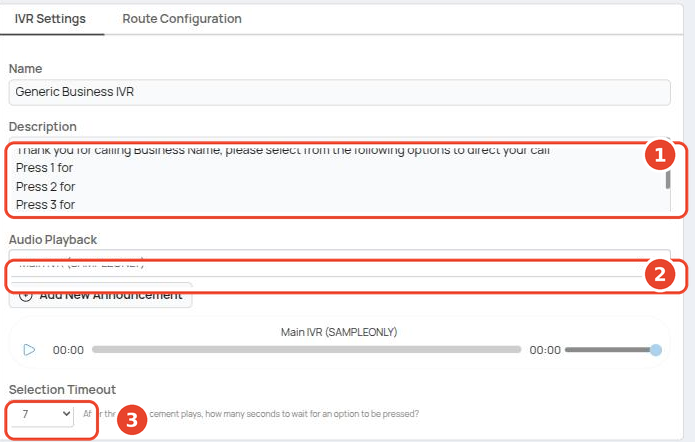
| Field | What it does |
|---|---|
| Name | A label for the IVR. |
| Description (①) | Your notes on the menu. Make it match the announcement word for word (e.g. "Press 1 for Sales, 2 for Support, 3 for Accounts") so the setup is easy to read. |
| Audio Playback (②) | The announcement callers hear. Pick an existing one or click Add New Announcement. |
| Selection Timeout (③) | Seconds to wait after the announcement for a keypress. |
¶ Route configuration
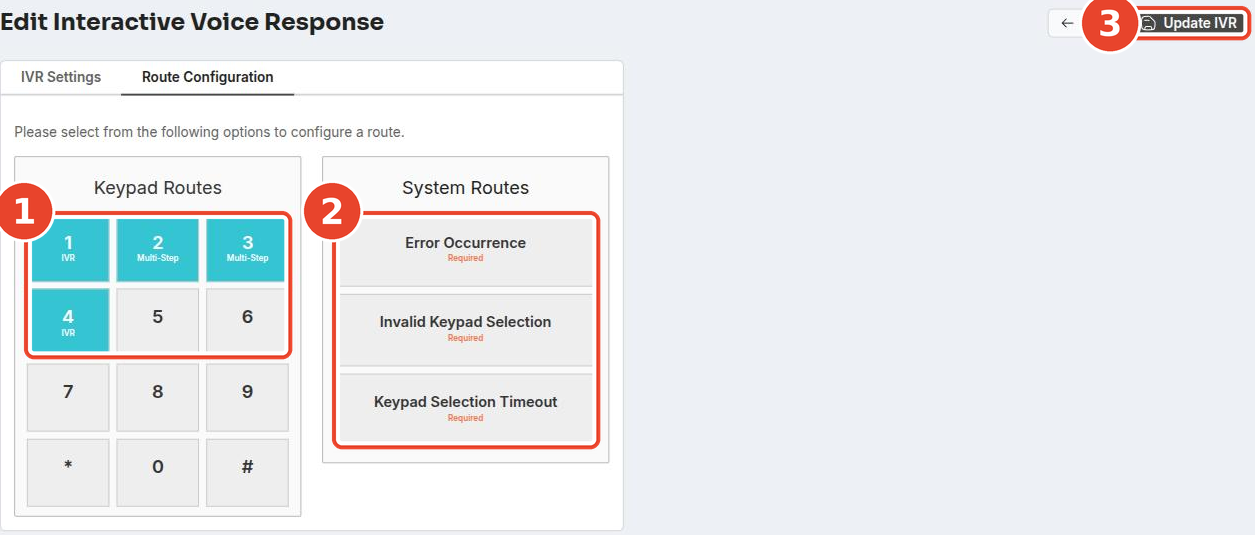
Keypad Routes (①), System Routes (②) and the Update IVR button (③).
¶ Keypad routes
Keys 1–9 and 0 can be configured; * and # are shown but can't be used.
- Click a key. The Route Setup - Keypad Option #N overlay opens.
- Choose Basic Route — Stand alone destination (①) and pick a destination (②), or Advanced Route — Multi-step for a six-row route.
- Optionally set a Display Screen Name for the answering phone's screen.
- Click Accept Route (③).
- Repeat for each key your announcement mentions.
- Click Update IVR.
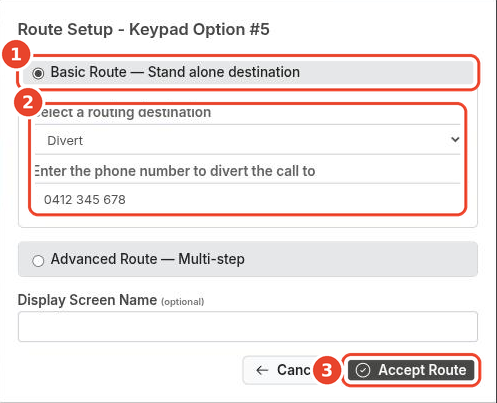
Accept Route only stages the change. Click Update IVR or it is lost.
| Destination | Notes |
|---|---|
| Divert | Enter the phone number (e.g. a mobile). Additional charges may apply. See Call Diversions. |
| Interactive Voice Response | { Repeat Current IVR } replays this menu; or pick another IVR for a sub-menu. |
| Any other type | Same route types as Call Routes. |
Configured keys are highlighted with their type. Use a multi-step key to, for example, ring an extension directly first, then fall through to a call group or queue if there's no answer. Multi-step keys follow the same route-ending rule.
¶ System routes
Set these the same way as a key. They run when the caller doesn't press a configured key.
| System route | When it runs |
|---|---|
| Error Occurrence | The caller presses a key that has no route, or something goes wrong handling the call. |
| Invalid Keypad Selection | The fallback when Error Occurrence or Keypad Selection Timeout is empty. |
| Keypad Selection Timeout | The caller presses nothing before the Selection Timeout expires — e.g. replay the IVR, or push them through to an extension, call group, or queue. |
All three are labelled Required, but the portal lets you save without them. If they are empty, a caller who presses a wrong key or nothing at all is hung up. Set each one — { Repeat Current IVR } is a safe choice.
Direct extension dialling: while the announcement plays, a caller can dial a user's 6-digit extension or MyPBX short code to reach them without the menu.
¶ The default Generic IVR
New accounts come with an IVR named Generic IVR ("Press 1 for Operations, 2 for Sales, 3 for Accounts, 4 to repeat").
| Key | Set to |
|---|---|
| 1, 2, 3 | Multi-step: Generic Queue → company announcement → a user / voicemail |
| 4 | Repeat the menu |
| Other keys | Not set |
| System Routes | All three empty |
It isn't attached to a number by default (new numbers route via time conditions). Before using it, review every key and fill in the three system routes.
¶ Put the IVR live
An IVR does nothing until a call reaches it. Add it as the last step in a number's call route — see Call Routes.
Test by calling the number: try every configured key, press an unconfigured key, and let the announcement time out.