Call routes control what happens when someone calls one of your numbers — which extension rings, in what order, and where the call ends up if nobody answers.
¶ Where routing is configured
A number's route only decides where a call goes first. What happens inside an IVR, call group or queue is set under Tools / Setup (IVR, Groups, Queues, Announcements), not on the number.
If your number routes to an IVR and you want to change what callers reach when they press a key, go to Tools / Setup → Interactive Voice Response and edit the IVR — not the number's route. If your route shows only Step 1 — IVR and no more rows (there is no Add Step button), that's by design: the IVR is always the last step. On the IVR, click the key → Basic Route → Divert → mobile → Accept Route → Update IVR. See Send every menu option to your mobile.
If the number never rings at all, start with Troubleshooting incoming calls.
¶ View your current routes
- Go to Numbers. The Routing To column (①) shows where each number currently points.
- Click Show Routes (②) to expand each number's full route.

¶ Edit a route
- Go to Numbers, click the number, then click Edit on the Call Routing panel. The Routing Setup panel opens.
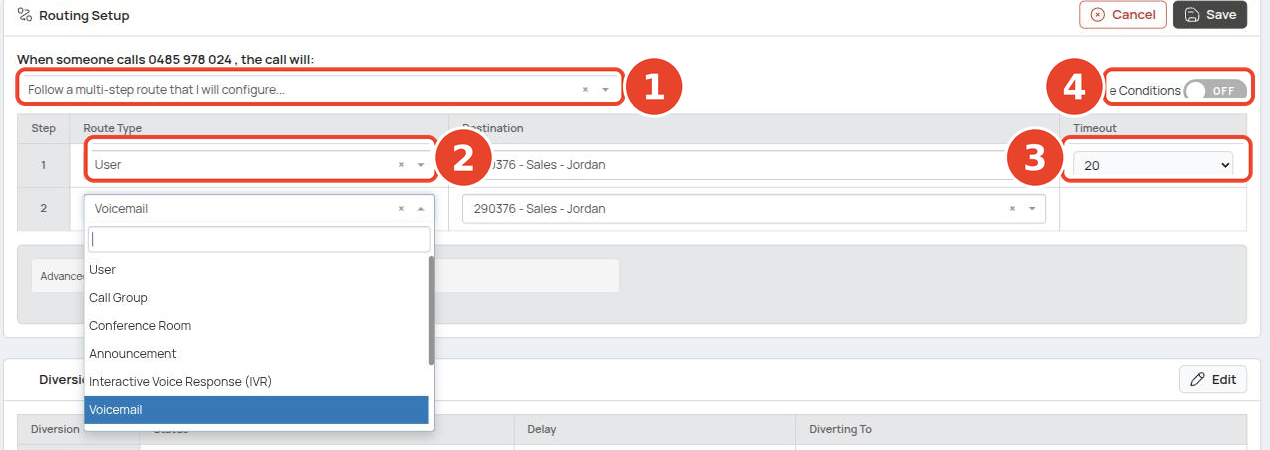
- Choose a route mode from the dropdown (①):
| Mode | Behaviour |
|---|---|
| Ring a user directly (or go to their voicemail if unavailable) | Rings one extension, then that user's voicemail. |
| Follow a multi-step route that I will configure... | The common choice — an ordered list of steps you define. |
- For a multi-step route, fill in the steps in order. Each has a Route Type (②), Destination and Timeout (③) — seconds before the call moves to the next step (default 20 for a user).
- Click Save.
There is no Add Step button. The table has up to six rows; unused rows show a Route Action placeholder (①). To add a step, pick a Route Type in the next empty row.
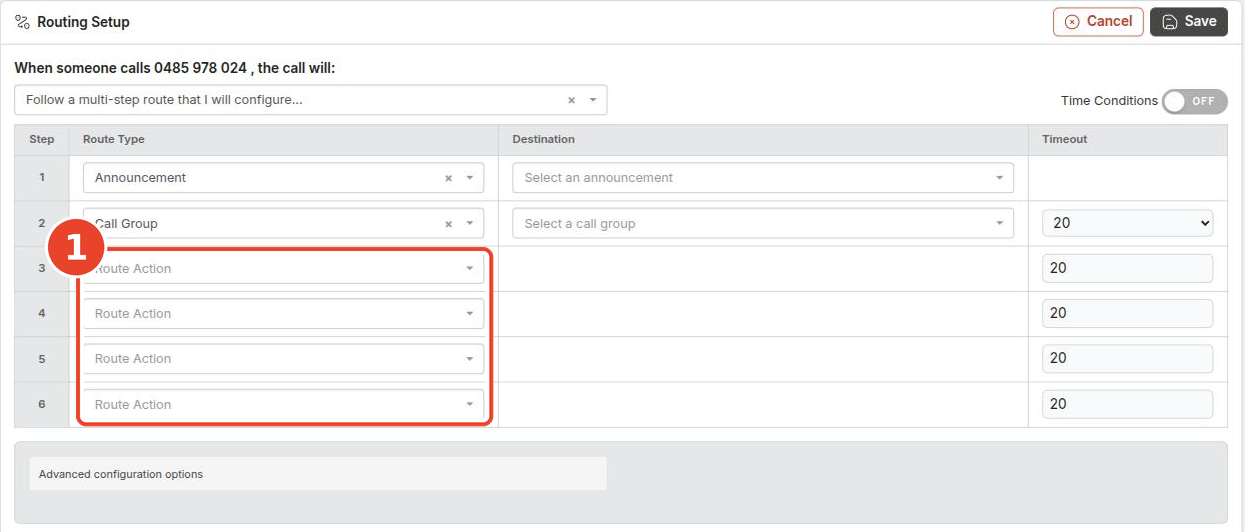
Advanced configuration options is for Enable trunking, not for adding steps.
Typical timeouts: 20–30 seconds for users and call groups. For queues, allow up to about 5 minutes — the queue keeps retrying agents during that time. No timeout applies to IVR, Announcement, Voicemail, Geo Route or AI — the column is blank.
¶ Steps that end the route
Some route types hand the call on permanently, so nothing can run after them (Ends the route? in the table below). Choose one and every row below it disappears; later steps are cleared on save.
So a route showing only Step 1 — Interactive Voice Response (IVR) and no further rows is correct and complete (①, ②): the IVR's keypad routes take over.
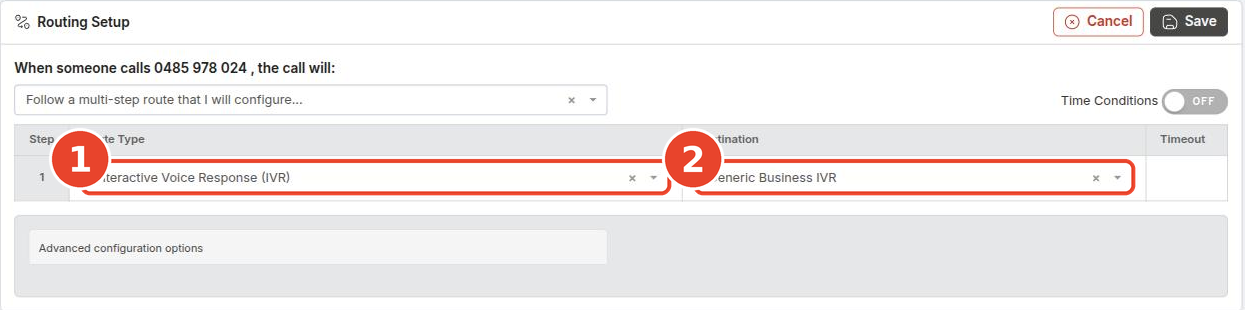
To play a welcome announcement or ring reception before the menu, put those steps first and the IVR last.
¶ Route types
| Route type | What it does | Ends the route? |
|---|---|---|
| User | Rings one extension. | No |
| Call Group | Rings a group of extensions. See Call Groups. | No |
| Queue | Holds callers and rings agents. Prefer a Queue over a Call Group where possible. See Call Queues. | No |
| Announcement | Plays a recorded message — e.g. a welcome message, business information, or an after-hours notice. See Announcements. | No |
| Interactive Voice Response (IVR) | Presents a press-1-press-2 menu; keypresses are routed by the IVR's Keypad Routes. See IVR. | Yes |
| Voicemail | Sends the call to a voicemail box. | Yes |
| Divert | Forwards the call to an external number. Additional charges may apply. See Call Diversions. | Yes |
| Conference Room | Joins the caller to a conference. Only listed if your account has conference rooms. | Yes |
| Geo Route | Routes based on the caller's location. See Geographic Routing. | Yes |
| AI | Routes the call to an AI agent. | Yes |
¶ Time conditions
Turn on the Time Conditions toggle (④) at the top of the route editor to give a number separate routes for business hours and after hours. Time conditions are what the *280 phone override and the Business Hours page act on.
¶ Example
A common setup for a main business number with Time Conditions on:
| Period | Steps |
|---|---|
| Business hours | 1. Announcement (welcome message) → 2. Call Group or Queue → 3. Voicemail |
| After hours | 1. Announcement (closed message) → 2. Voicemail |
¶ Diversions, tags and ringtones
On the Manage Number page you can also set:
- Diversions — Busy, No Answer and Immediate diversions for the number. See Call Diversions.
- Tags — label numbers to keep them organised.
- Ringtone — set a distinct ringtone per number, so staff can tell which line is ringing and distinguish internal from external calls before answering.
¶ Best practices
- Keep routes simple — fewer steps are easier to maintain and troubleshoot.
- Always end with a fallback step, usually Voicemail, so no call dead-ends.
- Test changes by calling your own number.
- Keep announcements current, especially opening hours and holiday messages.
- Review your call reports to see where calls are getting stuck, and adjust the route.